lolMiner
lolMiner is a popular miner for AMD and Nvidia, providing stable mining. With lolMiner, you can mine coins such as Ethereum Classic (ETC), Zilliqa (ZIL), Ergo (ERG), and many other coins.

Key Features
AMD and Nvidia Support
— ensures compatibility and high performance on graphics cards from both manufacturers.
Stability
— optimized for long-term and continuous mining without interruptions.
Multi-Algorithm Support
— allows mining various coins, such as Ethereum Classic (ETC), Zilliqa (ZIL), Ergo (ERG), and others.
Coins Mined with lolMiner
With lolMiner, you can mine a variety of cryptocurrencies. Here is a list of coins you can mine:
Here are some interesting numerical facts:
Installing lolMiner
To start mining, follow these simple steps:
Download lolMiner: Download the latest version of lolMiner from our website above (Windows or Linux).
Unzip the Archive: After downloading, unzip the archive to a convenient location, such as your desktop.
Select the Desired .bat File: The archive contains multiple
.batfiles, such asmine_etc.bat,mine_flux.bat,mine_ergo.bat, and others. Select the file that corresponds to the coin or algorithm you want to mine. For example, for Ethereum Classic, selectmine_etc.bat.-
Configure the Selected .bat File: Open the chosen
.batfile in a text editor (e.g., Notepad) and edit parameters such as the pool address and your wallet. Example line:lolMiner.exe --algo ETHASH --pool pool_address --user wallet_address Save Changes: After making changes, save the file and close the editor.
Start Mining: Double-click the configured
.batfile to start mining.
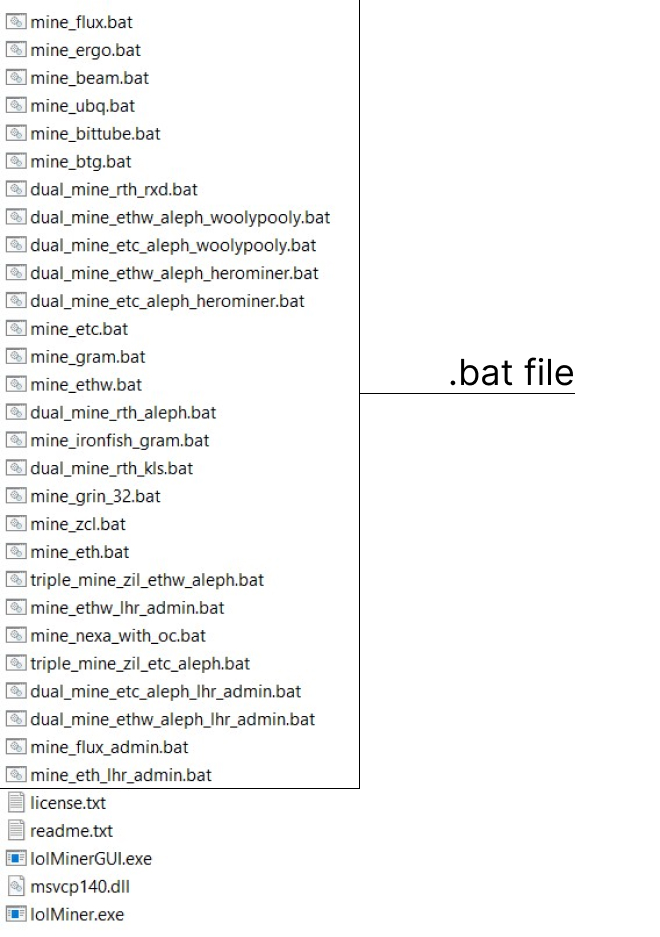
Setting Up the .bat File for lolMiner
Below are some examples of how to configure a .bat file for key coins.
Parameter Explanations:
Setting up the .bat File for Ethereum Classic (ETC) with lolMiner
- Algorithm:
- Ethash (used for Ethereum Classic)
- Pool:
- e.g., etc.2miners.com
- Port:
- 1010
- Wallet:
- Replace
YOUR_ETC_WALLETwith your ETC wallet address.
lolMiner.exe --algo ETHASH --pool etc.2miners.com:1010 --user YOUR_ETC_WALLET.rig0Setting up the .bat File for Zilliqa (ZIL)
- Algorithm:
- ZIL
- Pool:
- zil.2miners.com
- Port:
- 3030
- Wallet:
- Replace
YOUR_ZIL_WALLETwith your ZIL wallet address.
lolMiner.exe --algo ZIL --pool zil.2miners.com:3030 --user YOUR_ZIL_WALLET.rig0Setting up the .bat File for Ergo (ERG)
- Algorithm:
- Autolykos
- Pool:
- ergo.herominers.com
- Port:
- 10250
- Wallet:
- Replace
YOUR_ERG_WALLETwith your Ergo wallet address.
lolMiner.exe --algo AUTOLYKOS --pool ergo.herominers.com:10250 --user YOUR_ERG_WALLET.rig0Setting up the .bat File for Ravencoin (RVN)
- Algorithm:
- KawPow (used for mining Ravencoin)
- Pool:
- Choose a pool for Ravencoin, e.g., rvn.2miners.com.
- Port:
- Default pool port, e.g., 6060.
- Wallet:
- Replace
YOUR_RVN_WALLETwith your Ravencoin wallet address.
lolMiner.exe --algo KAWPOW --pool rvn.2miners.com:6060 --user YOUR_RVN_WALLET.rig0Video Guide
Dual and Triple Mining
Example of Setting Up a .bat File for Dual Mining (Ethash + Zilliqa)
Algorithms:
- Ethash (for example, for Ethereum Classic or another coin on this algorithm)
- Zilliqa (ZIL)
Pools:
- Ethereum Classic (ETC):
etc.2miners.com:2020 - Zilliqa (ZIL):
zil.flexpool.io:4444
Launch Command:
@echo off
cd /d %~dp0

:: Dual Mining Ethereum Classic + Zilliqa
lolMiner.exe --algo ETHASH --pool etc.2miners.com:2020 --user YOUR_ETC_WALLET.YOUR_WORKER_NAME ^
             --algo ZIL --pool zil.flexpool.io:4444 --user YOUR_ZIL_WALLET.YOUR_WORKER_NAME
pause- Replace
YOUR_ETC_WALLETandYOUR_ZIL_WALLETwith your wallet addresses for ETC and ZIL, respectively. YOUR_WORKER_NAME– the name of the worker you want to use on both pools.
Example of Setting Up a .bat File for Triple Mining (Ethash + Zilliqa + Ergo)
Algorithms:
- Ethash (Ethereum Classic)
- Zilliqa (ZIL)
- Autolykos2 (Ergo)
Pools:
- Ethereum Classic (ETC):
etc.2miners.com:2020 - Zilliqa (ZIL):
zil.flexpool.io:4444 - Ergo (ERG):
ergo.herominers.com:10250
Launch Command:
@echo off
cd /d %~dp0

:: Triple Mining Ethereum Classic + Zilliqa + Ergo
lolMiner.exe --algo ETHASH --pool etc.2miners.com:2020 --user YOUR_ETC_WALLET.YOUR_WORKER_NAME ^
             --algo ZIL --pool zil.flexpool.io:4444 --user YOUR_ZIL_WALLET.YOUR_WORKER_NAME ^
             --algo AUTOLYKOS --pool ergo.herominers.com:10250 --user YOUR_ERG_WALLET.YOUR_WORKER_NAME
pause- Replace
YOUR_ETC_WALLET,YOUR_ZIL_WALLET, andYOUR_ERG_WALLETwith your wallet addresses for ETC, ZIL, and ERG, respectively. YOUR_WORKER_NAME– the name of the worker you want to use on all pools.
Supported Algorithms
Mining Algorithm Fees
Mining Algorithm Fees
| Algorithm | Fee % |
|---|---|
| Alephium | 0.75 |
| Autolykos V2 | 1.5 |
| BeamHash III | 1.0 |
| Cuckoo 29 | 2.0 |
| CuckarooD 29 | 2.0 |
| CuckarooM 29 | 2.0 |
| Cuckaroo 30 CTXC | 2.5 |
| Cuckatoo 31 | 2.0 |
| Cuckatoo 32 | 2.0 |
| Cuckaroo 29-32 | 1.0 |
| Cuckaroo 29-40 | 1.0 |
| Dual ETC + (KAS/ALEPH) | 1.0 / 0.0 |
| Dual ETH (ETHW) + (KAS/ALEPH) | 1.0 / 0.0 |
| Dual RTH + (ALEPH/GRAM/PYI/RXD) | 1.0 / 0.75 – 1.0 |
| Dual IRON + (ALEPH/GRAM/PYI/RXD) | 1.0 / 0.75 – 1.0 |
| Equihash 144/5 | 1.0 |
| Equihash 192/7 | 1.0 |
| Equihash 210/9 | 1.0 |
| Etchash | 0.7 |
| Ethash (ETHW) | 0.7 |
| Ironfish | 1.0 |
| Kaspa | 0.75 |
| Karlsen | 1.0 |
| KarlsenV2 | 1.0 |
| Nexa | 2.0 |
| Pyrin | 1.0 |
| PyrinV2 | 1.0 |
| Radiant | 0.75 |
| Rethereum | 1.0 |
| TON/GRAM | 1.0 |
| ZelHash (Flux) | 1.0 / 1.5 |
List of Basic Commands for lolMiner
Specifies the algorithm used for mining.
For example, --algo ETHASH for Ethereum and Ethereum Classic.
The mining pool address.
For example, --pool etc.2miners.com:2020.
Specifies the wallet address and, if necessary, the rig name.
Example: --user YOUR_WALLET_ADDRESS.YOUR_WORKER_NAME.
Password for connecting to the pool. By default, it is left blank (--pass x), but some pools may require a value.
Defines which devices will be used for mining.
For example, --devices 0,1 to use the first two GPUs.
Sets the port for the internal API, allowing you to monitor the miner’s status.
Example: --apiport 4028.
Sets the operating mode (e.g., --workmode 1 for normal mode).
Enables or disables the watchdog timer for automatic restarts on errors.
For example, --watchdog 1 to enable.
Enables logging of the miner’s activities.
Example: --log on.
Enables or disables SSL for the pool.
For example, --tls 1 to enable SSL.
Sets a temperature limit for GPUs.
For example, --templimit 75 sets a limit at 75°C, after which mining will stop.
Sets the minimum temperature for mining to resume after cooling down.
Example: --tstart 65.
Sets the minimum and maximum fan speed percentages.
For example, --fanmin 30 and --fanmax 80.
Specifies the kernel version for optimization with a specific algorithm or GPU.
Example: --kernel 1.
Enables low load mode to reduce power consumption.
For example, --lowload 1 to activate.
lolMiner Community
If you have any questions or difficulties using lolMiner, feel free to contact us at info@lolminer.me.